
The short answer
- Best overall for earnings options: EarningsWatcher. The only tool we found that covers all five points in the checklist below in one membership, from finding the setup to pricing it through the report, and you can run it from ChatGPT or Claude.
- A free implied-move number before one report: Barchart, EarningsWatcher’s public implied-move pages, or your broker.
- One stock’s past straddle results, quickly: OptionSlam.
- Whisper numbers and earnings expectations: Earnings Whispers.
- A broad analytics site with an earnings section: Market Chameleon.
- Options data and an API for your own models: ORATS.
- Order flow and dark-pool activity: Unusual Whales.
- Charts of the expected move, open interest and skew: OptionCharts.
- Building a position or scanning with an earnings filter: OptionStrat or Option Samurai.
- Using AI (ChatGPT, Claude) on real earnings data: see AI tools for earnings options.
What a good earnings options tool gives you
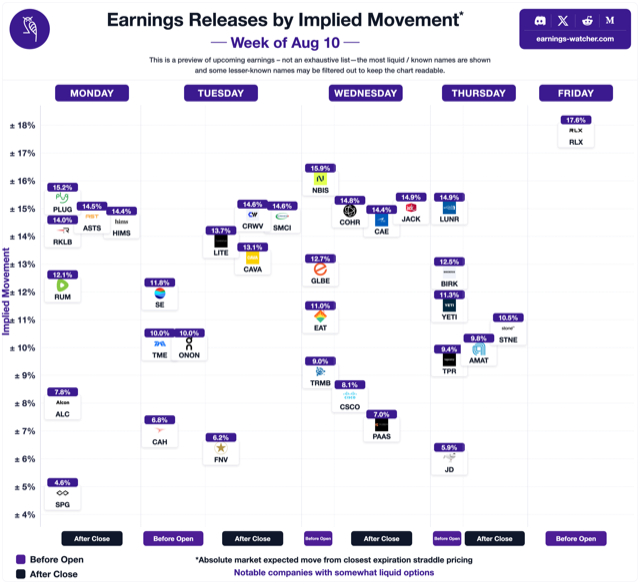
- The implied move next to the past moves. A ±8% implied move means little on its own. Next to the stock’s last eight reactions it tells you whether options look rich or cheap. (Here is how the implied move is calculated.)
- How implied volatility behaves. IV usually climbs into the report and collapses right after it. A tool should show both, because many trades make or lose money on IV, not on the stock.
- A way to price the trade through the print, including the IV crush. A payoff chart that ignores the crush is wrong.
- Backtests on past reports, so you can see how a straddle, strangle or spread actually did on that stock quarter after quarter.
- A calendar with timing. Before the open or after the close decides which expiry captures the move.
Most tools cover one or two of these, so most traders end up stitching a data site, a strategy builder and their broker together. EarningsWatcher is the one we found that covers all five; you still place the trade with your broker.
The tools at a glance
| Tool | Built for | Earnings features | Free access | AI / API |
|---|---|---|---|---|
| EarningsWatcher (our pick) | Options trading around earnings | Implied vs. realized history, IV Rush Radar, simulator through the print, scanner, backtester, post-earnings drift | Public implied-move pages and calendars; platform is a membership | Member MCP server (ChatGPT, Claude, Cursor) |
| Barchart | Market data portal | Expected-move pages, upcoming-earnings list | Public pages | Not confirmed |
| Earnings Whispers | Earnings expectations | Whisper numbers, calendar, implied vs. average move | Free account; trader tools paid | None found |
| Market Chameleon | Stock and options analytics | Implied vs. historical move, straddle performance, earnings screeners, backtests | Starter tier; earnings tools for premium users | Paid data feeds |
| OptionCharts | Options charting | Expected-move chart, open interest, volume, max pain, probability distribution | Free with ads; paid plans unlock all charts | None found |
| OptionSlam | Earnings options | Straddle history (implied vs. actual), implied-move screeners, backtester | Last two reports per stock | None stated |
| OptionStrat | Strategy builder | Earnings dates and implied-move ranges on the payoff chart | Free builder | None found |
| Option Samurai | Options scanner | Earnings-date filters and scans | Free trial only | None stated |
| ORATS | Options data and backtesting | Earnings move report, earnings backtests, implied earnings move in the API | No free tier found | Data API, AI agent |
| tastytrade | Brokerage platform | Expected-move overlay, earnings watchlist | With an account | Open API, MCP server |
| thinkorswim | Brokerage platform | Market Maker Move | With a Schwab account | Not checked |
| Unusual Whales | Options flow | Per-stock earnings pages | Free plan (delayed) | API, MCP server |
The tools, by what they are built for
Built around earnings options
EarningsWatcher Our pick
Best for: anyone who trades options around earnings and wants the whole trade in one place.
EarningsWatcher is built for one event, the earnings report, and goes deeper on it than anything else on this list. The Moves Analyzer puts each stock’s implied move next to every past reaction. The IV Rush Radar shows which names’ volatility tends to climb into the report, with live signals. The simulator prices a straddle, strangle or spread through the print with the IV crush included, and the backtester shows how that trade did on the stock’s past reports. A scanner, data-driven picks, DriftLab for post-earnings drift and sympathy plays complete the toolkit.
Two things no other tool here offers: members can run the whole platform from ChatGPT, Claude or Cursor through the EarningsWatcher MCP server (90+ tools), and they can practise in 1v1 trading duels and paper trading before risking money, with daily livestreams, a private Discord and a 15-lesson beginner course alongside. Rated 4.8/5 on Trustpilot and 4.5/5 in TradingToolsHub’s review.
Look elsewhere if you need a broker, order-flow data, or a raw data API for your own models. It covers earnings, not every market event.
OptionSlam
Good for: a fast look at how one stock’s straddle did on past reports.
OptionSlam is focused on earnings options. Each ticker page shows the implied move against the actual close and maximum move, marks each report inside or outside the implied range, and shows the straddle’s price and return. It also has weekly and monthly implied-move screeners, a historical-move screener, an earnings volatility rating, a strategy backtester and a calendar. Free pages show the last two reports in full; older history needs a membership.
Analytics sites with an earnings section
Barchart
Good for: a quick expected-move number on a public page.
Barchart’s per-ticker expected-move pages are built from the at-the-money straddle and show the earnings date and timing next to the last four actual moves. An upcoming-earnings page lists optionable stocks with their expected move. It is a broad market-data portal, so earnings is one section among many.
Earnings Whispers
Good for: earnings expectations (whisper numbers) and a well-known calendar.
Earnings Whispers is known for its whisper numbers and Whisper Score. Its trader tools add a volatility view (implied move vs. average past move for the next two weeks of reporters), options activity around earnings, and a list of notable moves that beat the implied move. A free account gets the calendars and a watchlist; the trader tools are a subscription.
Market Chameleon
Good for: traders who want a wide analytics site with a deep earnings section inside it.
Market Chameleon covers stocks and options broadly. Its Earnings Trader menu includes an implied-move tool that compares the current implied move with the stock’s own history, historical vs. implied earnings moves, straddle performance, an earnings stock-pattern screener, an earnings option-strategy screener, backtests and a calendar. There is a free Starter tier; the earnings analysis tools are listed for premium users. It also sells data feeds, including an earnings data feed.
Options data and APIs
ORATS
Good for: data-heavy traders and developers who want an API and deep backtests.
ORATS publishes a daily earnings move report (implied move, historical average move, IV with and without earnings), backtests of earnings straddles and calendars, and an API that includes the implied earnings move, the last twelve realized moves and an earnings-dates feed. Its homepage also lists an AI agent and a command-line tool for AI agents. We found no free tier on its site. For raw data and an API, it is the strongest option here.
Order flow
Unusual Whales
Good for: options flow, dark-pool and congressional trading data.
Unusual Whales is built around order flow. Each stock has an earnings page with past report dates and reactions. The free plan shows delayed flow; paid plans add live data, an API and an official MCP server for AI assistants. Choose it when the flow is your signal; it is not an earnings-volatility tool first.
Charts, builders and scanners
OptionCharts
Good for: a quick visual read of what the options market expects for one stock.
OptionCharts is an options-only charting site with more than 20 charts per ticker, including an expected-move chart, open interest and volume by strike, max pain, a profit-and-loss chart and a probability distribution that compares a lognormal model with the distribution implied by option prices. The free site carries ads; paid plans unlock every chart, full options history, data export and, on the top plan, real-time data. It is a general options tool rather than an earnings tool: we found no view of a stock’s past earnings moves on its site.
OptionStrat
Good for: building and visualising a position.
OptionStrat is a strategy builder and visualiser with an options-flow feed. Earnings dates show on the P&L table, premium users get the implied-move range drawn on the chart, and an IV slider lets you model the drop after the report. It has no dedicated earnings history or scanner, so traders usually pair it with a data source for the implied-vs-past comparison.
Option Samurai
Good for: scanning for option setups with an earnings filter.
Option Samurai is an options scanner. You can filter by earnings date (before or after expiration) and, since its Q3 2026 update, by before-open or after-close timing; it also has a predefined earnings scan and a weekly email of next week’s reporters. It offers a free trial rather than a free tier.
Inside your broker
thinkorswim and tastytrade
Good for: seeing the expected move where you already trade, and placing the trade.
Schwab’s thinkorswim shows the Market Maker Move, an options-implied size of move (not direction) that appears ahead of events such as earnings. tastytrade can overlay the expected move on its trade page and has an upcoming-earnings watchlist; its Open API now has an official MCP server. Both come with a brokerage account, and every tool above still needs a broker to place the trade. Neither puts the implied move next to the stock’s past earnings moves or backtests the trade, which is the gap the dedicated tools fill.
AI tools for trading options around earnings
ChatGPT, Claude and other assistants are good at explaining a strategy and weak at numbers they don’t have: ask one for a stock’s implied move without a data connection and it will guess. The fix is an MCP server, a connector that lets the assistant call a real data source.
- EarningsWatcher MCP (members): 90+ tools covering implied moves, past reactions, IV Rush signals, the simulator, the scanner, backtests, paper trades and the journal, inside ChatGPT, Claude or Cursor. You can ask “which reporters this week have an implied move below their usual move?” and get the answer from live data. How it works.
- Unusual Whales MCP: flow, earnings history and screeners from Unusual Whales data.
- tastytrade Open API MCP: connects an assistant to your tastytrade account and market data.
- ORATS: lists an AI agent and an AI-agent command-line tool on top of its data.
Whichever you use, check that the numbers in an answer came from a tool call, not from the model’s memory.
Which one should you start with?
| If you… | Start with |
|---|---|
| trade options around earnings and want one tool that does it all | EarningsWatcher (our pick) |
| just want the implied move before one report | Barchart, EarningsWatcher’s public pages, or your broker (all free) |
| only need one stock’s straddle history now and then | OptionSlam’s free pages |
| care most about expectations and whisper numbers | Earnings Whispers |
| are new to earnings trades and want to learn the workflow | EarningsWatcher (beginner course, playbooks, paper trading) |
| trade earnings every week | EarningsWatcher or Market Chameleon, plus your broker for execution |
| build your own models | ORATS |
| trade off order flow | Unusual Whales |
| want to work in ChatGPT or Claude | an MCP server connected to real data (see above) |
Frequently asked questions
What is the best tool for trading options around earnings?
Our pick is EarningsWatcher, because it is the only tool we found that covers the whole earnings trade in one place: the implied move against past moves, how IV behaves before and after the report, a simulator that prices the trade through the print with the IV crush, backtests on past reports, and an MCP server to run it from ChatGPT or Claude. We make EarningsWatcher, so weigh our view accordingly. For other jobs: Market Chameleon is a broad analytics site with an earnings section, OptionSlam is a quick source for one stock's straddle history, and ORATS suits data-heavy traders who want an API.
What is the best AI tool for options trading around earnings?
An AI assistant is only as good as the data it can reach. ChatGPT or Claude connected to a data source through an MCP server gives answers built on live numbers instead of guesses. The EarningsWatcher MCP server gives members 90+ earnings tools (implied moves, past reactions, IV Rush signals, the simulator, backtests and paper trading) inside ChatGPT, Claude or Cursor. Unusual Whales and tastytrade also offer MCP servers for flow data and brokerage accounts.
Is there a free tool to see a stock's implied move before earnings?
Yes. Several sites publish implied moves on public pages, including EarningsWatcher's implied-move pages and earnings calendars, Barchart's expected-move pages and OptionSlam's ticker pages for the last two reports. Brokers such as thinkorswim (Market Maker Move) and tastytrade (expected move) also show it to account holders.
What is the Market Maker Move on thinkorswim?
The Market Maker Move is thinkorswim's options-implied estimate of how far a stock may move around an event such as earnings. It gives a size, not a direction, and it is derived from the extra implied volatility in the front-month options.
Can ChatGPT find earnings options trades on its own?
Not reliably. Without a data connection ChatGPT does not know today's implied moves, implied volatility or a stock's past earnings reactions, and it may state plausible-looking numbers that are wrong. Connect it to a real data source (an MCP server) and check that every figure in an answer came from a tool call.
Product names belong to their owners. Features were checked on each product’s own website and help pages in November 2026 and can change; confirm on the site before you subscribe. Educational information, not investment advice.