How a Member Turned EW MCP Into a Personal Trading OS
Not a “ask ChatGPT for picks” story. Lifetime member littlebeard wired Earnings Watcher into his AI workflow, turned the channel into searchable heuristics, and ran a real IV Rush paper trade end to end — research, automation, journal.
Most people try a new trading tool like this: open the app, poke around, maybe paper one trade, then forget it.
littlebeard did the opposite — and he didn’t need a new dashboard to do it. He did it in chat.
What using our MCP looks like
No API keys to babysit. No CSV exports. You connect Earnings Watcher once, then you talk to it like a coworker who already knows the platform:
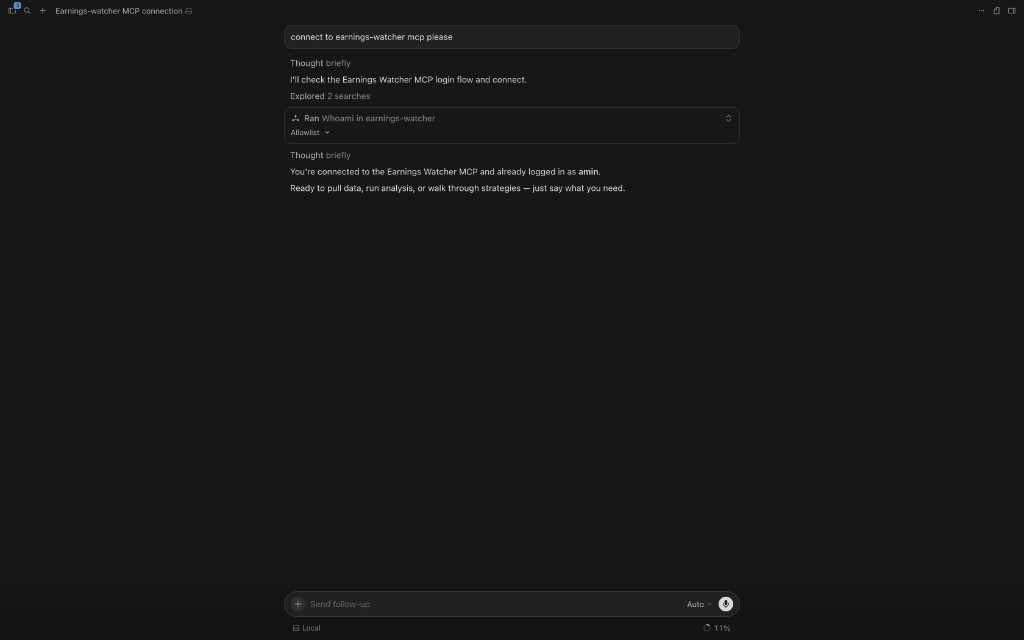
That’s the product surface. The rest of this case study is what littlebeard built on top of it in about a week: a personal trading OS, a YouTube → heuristics pipeline, and a closed NFLX IV Rush paper trade with a written postmortem. All without treating the AI like a guru.
2. Building the vault — a personal trading OS
Chat is the front door. What littlebeard did next is the interesting part: he turned MCP answers into a durable knowledge system he could reopen on trade day.
Their map of content isn’t a bookmark list — it’s an architecture:
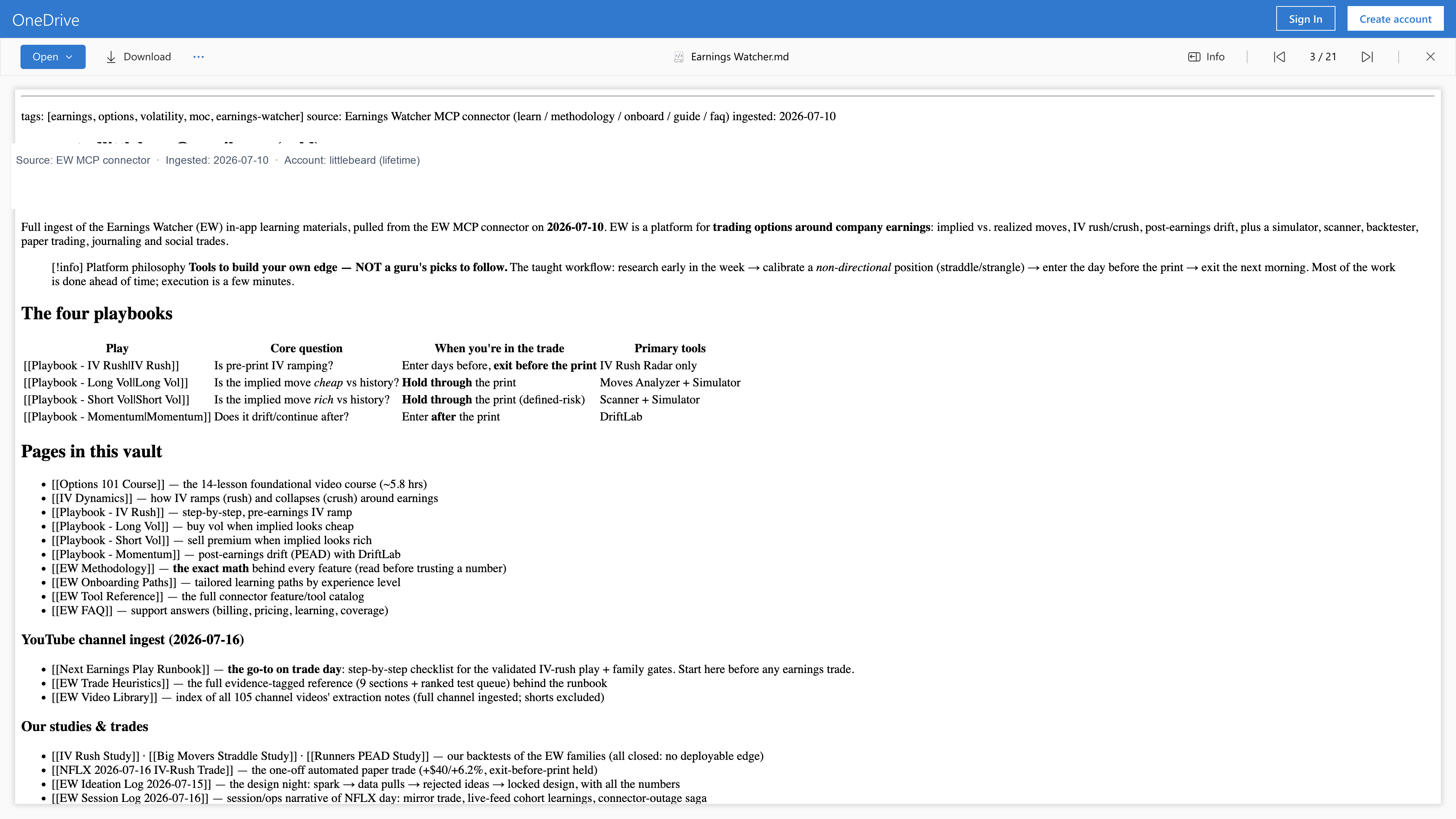
What they pulled in first (via MCP learning tools + their own notes):
- Options 101 — foundational course outline (~14 lessons / ~5.8 hrs)
- IV Dynamics — rush vs crush in plain language
- Four playbooks — IV Rush, Long Vol, Short Vol, Momentum (each wired to the right EW tools)
- Methodology + tool reference + FAQ + onboarding paths — so platform numbers aren’t “magic”
Why that matters: once the playbooks live in their vault, every later chat starts from shared context. They’re not re-explaining IV Rush every morning. They’re asking, “Is this name analysis-ready today?”
Tools to build your own edge — not a guru’s picks to follow.
That line sat at the top of their vault. It’s also the point of MCP: the connector should make you better at using EW, not replace your judgment.
3. Turning YouTube into a trade-day system
Watching videos is easy. Keeping the lessons is hard. This is where the MCP workflow got interesting.
On trade week they ran a full YouTube channel ingest and converted it into three working docs:
| Artifact | What it became | Why it matters |
|---|---|---|
| EW Video Library | Index of extraction notes across ~105 videos | Searchable memory instead of “I think Amin said something about noon exits” |
| EW Trade Heuristics | ~21 KB evidence-tagged rules (their longest reference doc) | Decision checklist, not vibes — when a setup is valid / invalid |
| Next Earnings Play Runbook | Step-by-step trade-day checklist | The “open this on the morning of” doc |
That trio is the difference between content consumption and an operating system:
- Library — what was taught
- Heuristics — what to do / not do
- Runbook — what to do today, in order
They also kept process logs — an ideation log (idea → locked design) and a session log for trade day. That’s journaling culture, not screenshot culture.
4. Deep dive: NFLX IV Rush paper trade (2026-07-16)
This is the proof the OS wasn’t theoretical. On Netflix’s AMC print day littlebeard ran the IV Rush playbook as a closed-loop experiment — research in chat, paper fills in more than one place, then a written postmortem.
The play (in his words)
- Structure: front-week ATM straddle
- Thesis: long vega into the pre-print IV ramp — not a bet on the earnings move
- Exit rule: out before the AMC print
- Goal: capture last-day IV demand, avoid binary event risk and IV crush
The setup he logged
| Field | What he wrote |
|---|---|
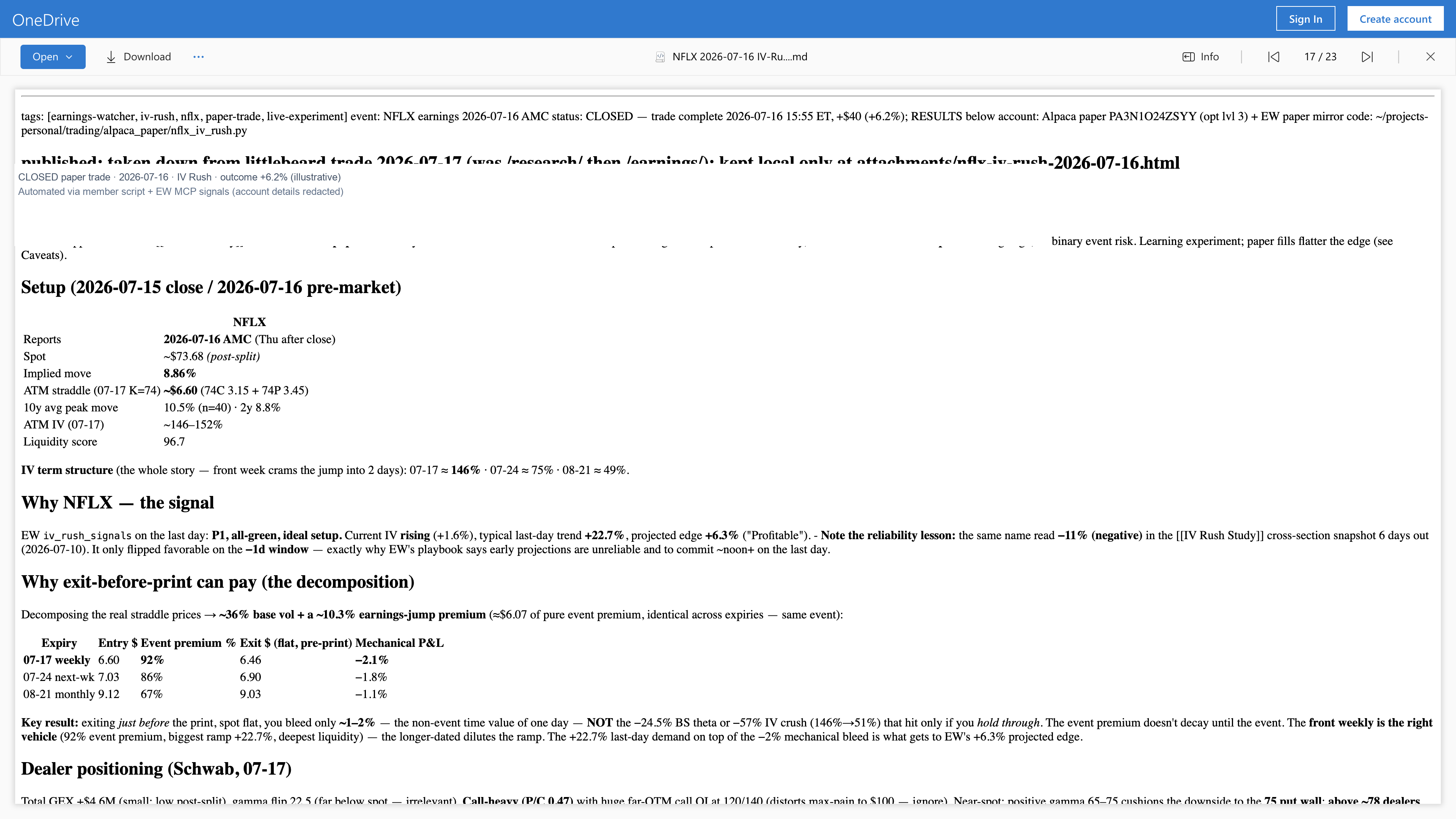
| Spot | ~\$73.68 (post-split) |
| Implied move | ~8.86% |
| ATM straddle (07-17 K=74) | ~\$6.60 (call ~3.15 / put ~3.45) |
| Front ATM IV | ~146–152% |
| Liquidity score | ~96.7 |
| Term structure | Front week elevated vs later weeks (~146% → ~75% → ~49%) |
Why NFLX — the MCP signal
He didn’t pick NFLX because it was “famous.” He used EW IV Rush signals:
- Labeled as a P1 / all-green ideal setup on the day that mattered
- Current IV trending up; typical last-day trend strong (~+22.7% in his note)
- Projected edge marked profitable (~+6.3% in his write-up)
Why “exit before print” can still make sense
His note decomposes the straddle into base vol vs earnings-jump premium, then shows the mechanical bleed of exiting flat before the print (~1–2% time-value) versus the crush/theta hit if you hold through (~tens of percent on his table). The edge he’s hunting is the last-day IV demand, not the overnight gap.
Paper trade twice — follow it everywhere
Here’s the MCP detail that makes this feel like a real product, not a blog experiment:
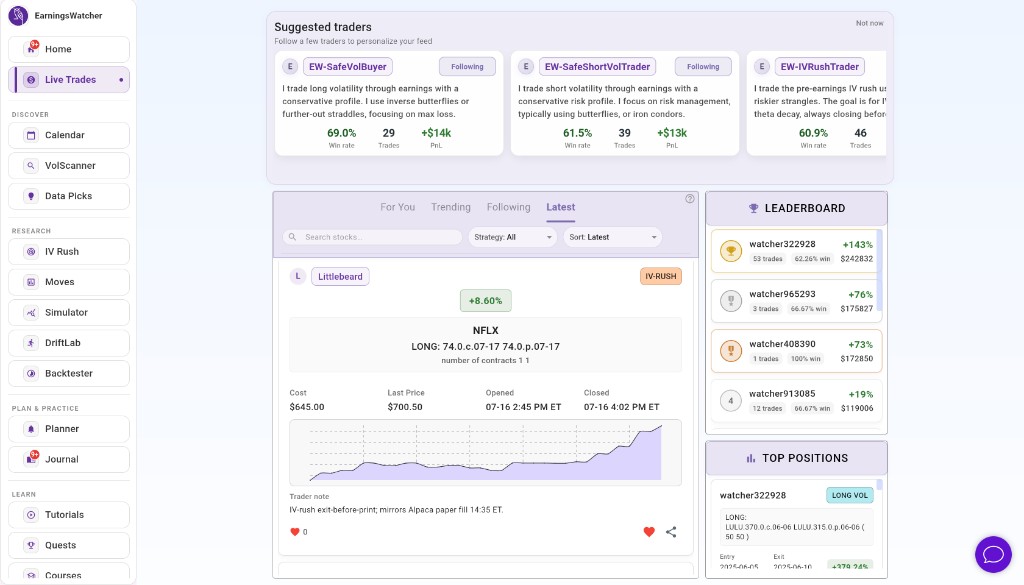
littlebeard didn’t only automate a fill at his broker paper account. He also asked the connector to open the same IV Rush paper trade on Earnings Watcher — so the position showed up in the app’s Live Trades feed, with the same story, while his external paper fill ran in parallel.
His trader note on the platform says it plainly:
IV-rush exit-before-print; mirrors Alpaca paper fill 14:35 ET.
That’s the point of “follow it everywhere”: chat for research and actions, EW Live Trades for the social/platform trail, broker paper for his own automation — one thesis, multiple mirrors, one journal.
How far he took automation
This wasn’t “type a prompt and hope.” He combined:
- MCP research — IV Rush signals, methodology, playbook checks
- EW paper trade via MCP — so the platform feed and journal stay in sync
- Member-side script — broker paper fill on a schedule
- Markdown postmortem — the durable note back in his vault
5. The four-step MCP loop (what to steal)
| Step | What they did | What you can do in chat |
|---|---|---|
| 1. Connect | Linked EW MCP to their AI client | Add the MCP URL in ChatGPT or Cursor |
| 2. Learn | Ingested playbooks + 105 videos → heuristics / runbook | “Teach me IV Rush step by step” / “Build my trade-day checklist” |
| 3. Research | Used IV Rush signals + live chain context on NFLX | “Is NFLX analysis-ready on IV Rush Radar?” |
| 4. Act + journal | Papered on EW and broker, exited before print, wrote the note | “Paper this on my EW account too” → journal |
They also ran studies that didn’t “win” as deployable edges (IV Rush / Big Movers / Runners notes marked closed). That’s a feature of a real OS: it can say no.
6. How to try the same setup
If the screenshot above felt familiar — good. That’s the bar. You should be productive in the first message.
- Open Earnings Watcher → Settings → AI Connectors (MCP) (or the in-app MCP page).
- Copy the MCP URL into ChatGPT (custom connector) or Cursor (Settings → MCP).
- Sign in with your EW account.
- Sanity check: “connect to earnings-watcher mcp” / “whoami” — you should see your account.
- Start learning: “Onboard me as options-familiar” or “Walk the IV Rush playbook.”
- On a real name: “Pull IV Rush signals for [ticker] reporting tomorrow — are we analysis-ready?”
- If you take a paper trade, ask MCP to place it on EW too so it shows in Live Trades — then force a journal note the same day.
Build your own MCP workflow
Connect Earnings Watcher in ChatGPT or Cursor — learn, research, paper trade, and journal in one place. Start from pricing if you’re not a member yet.